SOUNDBOARD STUDIO ALTERNATIVE
THE SOUNDBOARD STUDIO ALTERNATIVE
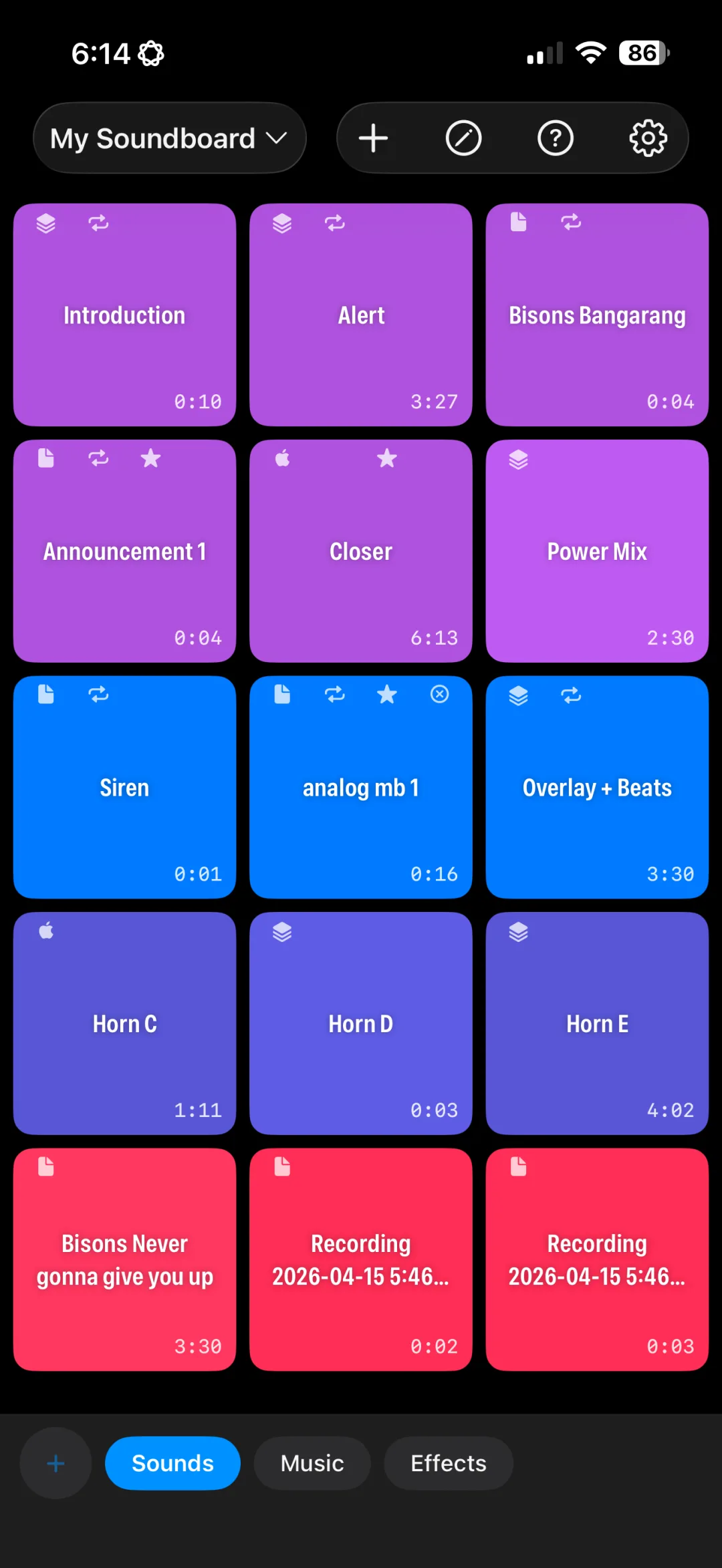
Everything you use a pro soundboard for (live shows, podcasts, theater, worship) with multi-track Compositions, Apple Music, and lifetime Pro for $49.99 instead of $159.99.
SOUNDBOARD STUDIO ALTERNATIVE
Everything you use a pro soundboard for (live shows, podcasts, theater, worship) with multi-track Compositions, Apple Music, and lifetime Pro for $49.99 instead of $159.99.
A side-by-side look at pricing, updates, and the features live-show users ask about most.
| Feature | ULTIMATE SOUNDBOARD PRO | SOUNDBOARD STUDIO |
|---|---|---|
| Free download | ✓ | ✓ |
| Pro, one-time purchase | $49.99 | $159.99 |
| Pro, yearly | $29.99/yr | $59.99/yr |
| Pro, weekly plan | None | $6.99/wk |
| Background audio | Free | Pro |
| Multiple boards | ✓ | ✓ |
| Trim & fades | ✓ | ✓ |
| Play sounds simultaneously | ✓ | ✓ |
| Multi-track timeline Compositions | ✓ | Track automations only |
| Bluetooth keyboard / foot switch triggers | Coming in 1.2 | ✓ |
| Minimum iOS | iOS 17 | iOS 13 |
Soundboard Studio pricing and features are from its US App Store listing, checked October 2026. Prices and features may change.
I was a Soundboard Studio user first. I originally used it to run audio for my youth hockey team. It was fine, but it was expensive, slow to set up, and never quite fit what I needed at the rink.
I'd also built the Ultimate Sports DJ apps for game-day audio. When I got the chance to help out with audio on a friend's podcast, I figured I could take the technology behind them and build a soundboard app that was actually amazing: quick to set up, fairly priced, and ready for live use.
That's Ultimate Soundboard Pro.
— ADAM, CREATOR OF ULTIMATE SOUNDBOARD PRO
The core soundboard workflow, plus tools built for how people produce audio today.
Layer and sequence several clips on a timeline with their own start times, volumes, and fades, then trigger them all with one button.
Set in and out points with up to 16x zoom and playhead scrubbing, then preview exactly what will play.
Search the Apple Music catalog and turn any song into a button with its album artwork applied automatically.
Build boards on your iPhone and run them from your iPad. Everything stays in sync.
Choose per button: toggle, stop others, or play simultaneously, and whether a second tap stops, fades, pauses, or restarts.
Record a drop or voice tag with a live level meter and it becomes a button instantly.
Hardware triggers: Soundboard Studio supports Bluetooth keyboards and foot switches today. Ultimate Soundboard Pro adds keyboard and foot pedal support in version 1.2.
Older devices: Soundboard Studio runs on iOS 13 and later. Ultimate Soundboard Pro requires iOS 17, so very old iPads and iPhones won't be able to install it.
Everything else: Ultimate Soundboard Pro gives you multi-track Compositions, Apple Music search, a zoomable waveform editor, and iCloud sync, with lifetime Pro at about a third of the price.
Bring your sounds with you.
Find the original files you imported into Soundboard Studio, wherever they live: the Files app, iCloud Drive, Dropbox, Google Drive, or your computer.
Import MP3, WAV, AAC, M4A, or AIFF files. Audio is copied into the app, so your boards keep working even if you move the originals.
Create a board per show, organize buttons into groups, and set trims, fades, loops, and playback behavior for each sound.
The free version includes 1 board with up to 8 buttons, so you can test it with a real show before upgrading.
If you use Soundboard Studio for podcasts, events, theater, or worship, Ultimate Soundboard Pro covers the core workflow (boards of buttons, trimming, fades, loops, simultaneous playback) and adds multi-track Compositions, Apple Music search, a zoomable waveform editor, and iCloud sync. Its lifetime Pro unlock is $49.99, compared with $159.99.
As listed on the US App Store in October 2026, Soundboard Studio Pro is $159.99 one-time, $59.99/year, or $6.99/week. Ultimate Soundboard Pro is $49.99 one-time or $29.99/year. Both apps are free to download.
Yes. Export or locate your original audio files (for example in the Files app, iCloud Drive, or Dropbox), then import them into Ultimate Soundboard Pro. Imported audio is copied into the app, so you can rebuild your boards with trims and fades in the waveform editor.
Coming soon. Bluetooth keyboard and foot pedal triggers arrive in version 1.2, so you can fire sounds hands-free during a live show. Want to know when it ships? Get in touch.
Soundboard Studio is a trademark of its respective owner. Ultimate Soundboard Pro is not affiliated with, endorsed by, or sponsored by Soundboard Studio or its developer.
Download Ultimate Soundboard Pro and rebuild your first board in minutes.
Download on the App StoreFree download. Pro is $29.99/year or $49.99 lifetime.